Showing posts with label Facebook. Show all posts

How To Get Old Facebook Look

Wednesday, September 21, 2011 |
How to get back to the Old Facebook Version From New Facebook Version.


Today,when i logged in to Facebook, i was highly surprised ! Facebook new Theme/Look is amazing...its pretty cool. Now again we got " Recent Activity Tab "on Sidebar but this time with Sliding Feature, A Suggestion tab named as " People To Subscribe To". Highly changed features are Recent Stories, From Earlier Stories, Size of Photos/Pictures Uploaded( it is much bigger & better ) .There is also change in limit of size of Video Uploading.


However, Some people does not like the New Facebook Look, not even me like the Facebook Home Page, may be it will take time to adopt it!. Then also who want to switch back to the Old Facebook Look or Theme , i have a simple trick for them.


How To Get Old Facebook Look / Theme


1. Go to the Facebook Account Setting.


2. Now, go to the last option i.e. Language. Click on Edit.


3. Change Language from English(US) to English(UK). Click on Save Changes.


All done! Congratulation you are Back to the Old Facebook Look/version/theme.. :) Enjoy!!


Note:- Users can also Change Language from English(US) to Hindi,Italiano & other regional languages to get old facebook look back.


Those Who Want to see New Facebook look & Features 2011 can Change Language from English(UK) to English (US).


Also Read-


1.How To Add Share on Facebook button in Web Browser  


2.Facebook New Mobile app for iPhone and Android For Sending Quick Messages
Read rest of entry

Facebook New Mobile app for iPhone and Android For Sending Quick Messages

Wednesday, August 10, 2011 |
Facebook Launches New Mobile App For Sending Quick Messages To Your Friends.Facebook new mobile app for iPhone and Android that will let you send text messages to multiple Facebook friends.It's called Facebook Messenger.
Facebook Messenger

It's good to see the first standalone mobile app from Facebook (i.e., other than the main Facebook app). 

What is New in Facebook Mobile app for iPhone and Android ?

Facebook New Mobile app for iPhone and Android For Sending Quick Messages has amazing features+

1.Reach friends right on their phones


Now you can send messages directly to your friends on their mobile phones, so you stay in touch no matter where you go. Message friends or anyone in your mobile contacts.you'll immediately see a list of all recent conversations you've been having through the Facebook Messages system, whether they've been via email, SMS, or the Facebook Web site. Then you can tap any contact to continue a conversation, or start a new one.

2.Get and send messages fast 

 With the new standalone Messenger app, now messaging with friends is faster than ever. Messages are delivered instantly, and they're always just a click away.

3. Make plans with groups on the go 

Group conversations make it easy to message everyone at once and see where your friends are.The ability to see your friends' location on a map and attach pictures.Don't want to share your location? Turn it off with one click.

Facebook Messenger is based on Beluga, the group-messaging company that Facebook scooped up earlier this year.

Read rest of entry

100th Post: My Blogging Journey

Saturday, October 2, 2010 |
Today in the evening, i login into my Blogger dashboard.I found that i am going to write my 100th post.I was very excited !! I click on the New Post button & started thinking the Title... After thinking i picked up 3 titles & ask my friends on facebook to choose the good catchy one.They were happy too & giving me compliments.

While they were giving their opinions,i just went to my Edit Posts page to see my journey from 0 to 99 posts,i was shocked ! there was an unpublished (Draft) Post which means i have to write one more post as that will be my 99th post.Now i was Unhappy & sad. Because now i have to think for my new post but soon i got my new post i.e. my 99th post NFS Hot pursuit.

After that, Once again i came back to selection of  title for my 100th Post.Most of my friends like-

          *** 100th Post: My Blogging Journey ***


So Tonight I’m writing my 100th blog post on kamleshinside.blogspot.com. Back when I began this blog in May 2009. My First Post was About Me. This was my first post Not my first Blog! As before kamleshinside.blogspot.com i had opened many other blogs with many Email IDs.I also found that this is the 12th month of my blogging which resembles that i have completed my 100th post in one year.

Why i became Blogger ?

I was highly inspired from my brother Ritesh Kawadkar who blogs at askritesh at that time.He is a Tech blogger.One day he showed his blog,Visitor stats,Comments,etc. I was Highly Impressed Name,Fame & ofcourse blog.He also told me about the Google Adsense. At the very same time i decided to open my Tech blog to make money online.After posting 5 posts i applied for google adsense. Google replies that "your site must be 6 months old". Then i came to know more about google adsense as i searched most of the thing about it.

So Why i became Blogger ? answer is simple just for Name,Fame & Money.

Mistakes

SEO, Copyright policy, was unknown for me.So i steal posts/contents especially of my brother blogs. (but i deleted all those posts after getting known about it.)

After some days i decided to open another blog as i didn't got the success on my first blog, so i made 1 more Email ID & so the blog. Through each blog i applied for google adsense.This process continues till i saw the create a blog option on right hand side in blogger Dashboard, which means we can start many blogs under one email id.


Finally i made another email id & start blogging.Here comes the another problem i.e. blog url, i was thinking,finding, then sunddenly my eyes stick to CPU & i got my Blog url "KamleshInside" (nonsense!) i have modified "Intel Inside".

This hilarious blog url makes me sad, but now i cannot change it.However the SEO gives me some relief.

I was not updating my blog regularly.Leave regularity, i am updating my blog after 3 months.as a result i lose my loyal visitors.

Mistakes i made- Many blogs, Bad blog url, No knowledge of SEO, Stealing Contents, Running behind money.,etc

Google Adsense

As i have told you above that from each blog i applied for google adsense. As a result my adsense account was approved on my first blog but soon it was disabled because i have applied for it again from another blog with another email id.This keeps on going as it is against google adsense policy & i keep on opening blogs with different email id.About this i come to know when i was login in my some old blogs & email accounts.

However, finally my adsense was approved in April 2010 & i earned more than 170$ just in 4 months.


But here also problem comes as always, No this time i have not made any mistake, it is the PIN code Verification letter send by google to verify the adsense account. Today it is almost 5 months but still i am waiting for letter. If it doesnt come within 1 month, i will lose my hard earned money :(
Hope i will receive it soon...

Adsense- Dont run behind money! it is not easy to make money, it requires lots of hardwork in every field.

My Blogs

1.MP PET Online counseling- a counseling blog

I remained active on skool to college. It has taught me a lot about SEO, Google Adsense, Popularity, effects of Social bookmarking,etc. All above it, it has solved my purpose of becoming blogger i.e. Name , Fame & Money!. Now i am thinking of opening a counseling website.

2.Kamlesh Inside- a tech blog!

Before posting my first post How To Make Computer Run Faster on kamleshinside.blogspot.com, i have a little knowledge about SEO, Making Money Online, Blogging, etc as i learned it from my mistakes!

Today i am writing my 100th post & i can say that now i am almost Expert in SEO,Google Adsense,Blogging,Blogger Templates,Tips n Tricks,....etc.

The thing i most like is Blogger Template Designing, soon i will start that tag.I was thinking of opening a tech website, but after looking at the Tech Blogs scenario i have postponed it.

However, i am going make kamleshinside a nice tech blog. I will be writing on SEO, Google Adsense, Blogger Templates, Blogger Tools,etc in the coming months.

As it is more than 3hrs. i am continuously writing my 100th post.Now i will say -

Thanks to

1. My elder brother who inspire, guide, motivate & support me.

2. My parents who are paying electricity, Net connection Bills. They never allows me to blog, as they hate computers. But then also i am blogging.

3. My brother vaibhav kawadkar who helps me in blogging.

4. My Friends Ankita gour & Anubha Saxena who helped me a lot.

Moral of the Story

You are going to tell me the Moral of the story! yes, you what message do you get from this post by author Kamlesh Kawadkar.Please comment & share your views...

Now it takes more than 1hr to edit it, i have deleted many parts. I will convert it into form of Tips n Tricks.Soon i will give Tips on it. So stay Tuned to KamleshInside.blogspot.com


Oh! i forget to announce the Giveaway to Celebrate the Completion of 100th Post of kamlesh Inside. In my Next post i will be giving gifts(worth $1230) to my readers...

So please Subscribe, Follow Kamlesh Inside blog & Follow Me on Twitter.


Do you have any suggestions or queries ?? then please comment !!

Read rest of entry

LinkedIn integrated with Windows Live & Facebook chat

Saturday, September 25, 2010 |

Windows Live has announced a new partnership with business-oriented social networking site LinkedIn.

LinkedIn contacts are linked to their corresponding Windows Live contacts, enabling existing Windows Live features such as picture tagging and the e-mail address book to include data from LinkedIn. LinkedIn status updates will now be visible in Messenger, just like existing MySpace and Facebook contacts. And just as with those status updates, comments posted from Windows Live will be visible in LinkedIn. Users can also update LinkedIn status from within Messenger, the natural counterpart to the ability to see contacts' statuses.

Connecting Windows Live profiles to LinkedIn is available immediately. Visibility of LinkedIn contacts in Hotmail has started rolling out already, and will be available worldwide in the next three weeks.
Read rest of entry

How To Add Share on Facebook button in Web Browser

Tuesday, May 11, 2010 |
.

Many times while surfing you read some nice article on the net which you want to share with your friends but the sad thing is the site doesn’t provide any social bookmarking option. So you have open your facebook profile and post it on you wall, with some excerpt. But this whole process can be made easy with just one click on your Bookmark Menu of your Browser.

How To Add Share on Facebook button in Web Browser

1. For sharing with facebook you just need a one click, lets know how to do it ?

2. First go to FaceBooks Share Options Page

3. There you will find Share on Facebook button like this one


4. All you have to do is just drag and drop this button on to you Bookmark Bar or the best option would be on your browser’s toolbar.

5. The main benefit of this button is it quickly share any web page with your friends, even when you’re not on Facebook.

6. After you drag the button to the Bookmarks Bar, it will look like this.

7. Now whenever you read anything interesting just click on this button and That article will be shared.

Do you find it Useful ??

Thank you! for visiting Kamlesh Inside
Read rest of entry

Top 10 Facebook Games

|
Hi geeks addicted to Online Games? Now a days Most of the people are found on Facebook playing Games. For them i have listed Top 10 Games You Can Play on Facebook


Its not just Social network that people are addicted too, now its social gaming too. People are more addicted to these gaming than ever before. With new and new games making their way in the richest platform Facebook, we tried to figure out which are the top 10 or 10 Best game in the facebook that you can play when you are bored, well some people (including me) even open facebook to play Games only. (addiction like never before)
Take a look at our 10 top picks for getting your Facebook game on.


Top 10 Facebook Games


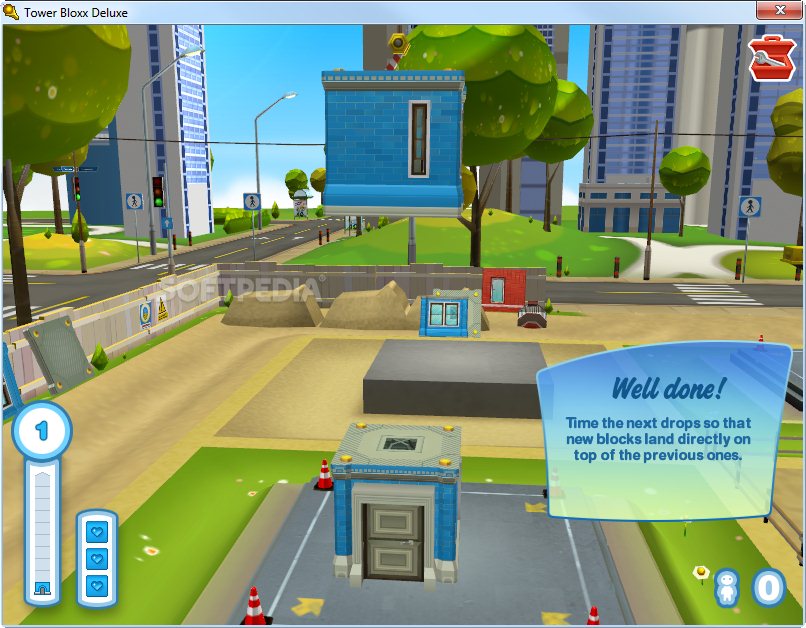
10.Tower Bloxx (176,805 fans)

About: Reach for the skies in this wacky skyscraper construction game. In Tower Bloxx Deluxe, your job is to make sure the new homes for the Tower Toons are built.. The Tower Toonsare funny little people who move in and turn on the lights before they even have a roof.
Tower Bloxx Deluxe 2 Bored at Facebook   Play Top 10 Games
As a renowned tower builder, you’ll use funky physics to rebuild cities like Sycamore Vale. Align building blocks that swing precariously from the crane in this dynamic Puzzle game, Tower Bloxx Deluxe.


9. Restaurant City (3,829,373 fans)

About: Cook up a storm in Restaurant City! Have you ever wondered what it might be like to start your own restaurant or cafe? How about we add a pinch of competition, say, a street full of restaurants run by your friends, allow you to create your own menu of amazing dishes, and top it off with a large dollop of fun? Sounds pretty tasty huh?
cooking playnow Bored at Facebook   Play Top 10 Games
Restaurant City lets you run your very own restaurant, cafe, or any eatery of your liking. Employ your friends to work for you as waiters, chefs, and even have them clean your place! With a wealth of different decorations, furniture and equipment to choose from you can really make your mark with a completely unique restaurant or cozy cafe. You can visit your friends’ restaurants too and even trade ingredients with them to help you create a menu which ensures your culinary creation is the talk of the town! Play now and let’s get cooking!


8. KickMania (51,222 fans)


 Bored at Facebook   Play Top 10 Games
About: Kick people as far as possible. If you kick them the farthest, you’ll own their ass and they’ll be notified how far you’ve kicked them. Each kick costs $100.If you found this game interesting than you may like to see this game too Threw Mummy.


7. Know It All ( 113,515 fans)


know it all trivia Bored at Facebook   Play Top 10 Games
About: Simple test game that will test your knowledge in different areas like spots, science, geography and others. You can challenge your friends to see which one of you is smarter.


6. Pet Society (4,687,418 fans)


pets playnow Bored at Facebook   Play Top 10 Games
About: Create and raise a happy pet in Pet Society! Play games, decorate your house and bring gifts to your friends’ pets when you visit them. Raise your pet and enjoy many activities together – racing, fishing, gardening, and cooking! Make your pet happy by earning coins to shop and buy stylish clothing and cool furniture. In the world of Pet Society, it’s non stop fun for you and your pet!


5. Fish Ville (4,359,609 fans)


 Bored at Facebook   Play Top 10 Games
About: An addictive game where you raise cute baby fish, feed them as they grow, and decorate your fish tanks with friends!


4. YoVille (3,262,579 fans)


yoville Bored at Facebook   Play Top 10 Games
About: YoVille(tm) is a Virtual World that allows users to create personal avatars that live in custom decorated homes. YoVillians, can chat, play mini-games, attend live events, and interact with real friends leaving them messages and gifts. When users are not online, their friends can come and visit their apartments and join their crew to help them make more money while they work. After work, YoVillians can head into town to shop to buy new furniture, clothes, and even buy pets!


3. Mafia Wars (1,547,653 fans)


mafia wars Bored at Facebook   Play Top 10 Games
About: Start a Mafia family with your friends, run a criminal empire and fight to be the most powerful family.


2. Farm Town (1,994,598 fans)

 Bored at Facebook   Play Top 10 Games
About: Design, grow and maintain your farm and even send gifts to your friends. Play now and share the fun with everyone!


1. Word Challenge (215,859 fans)

word playnow Bored at Facebook   Play Top 10 Games
About: In Word Challenge you are given 6 letters, the objective is to create 3-6 letter words from the letters provided as fast as you can. There are 40,000 to find in this fast and rewarding word game! You can go into a head to head battle of words with one of your friends in the ‘Challenge Mode’. Can you come out on top?

0. Best Game Of Facebook – FarmVille
 Bored at Facebook   Play Top 10 Games
With 11,309,560 fans FarmVille tops all the Games in Facebook. FarmVille is a real-time farm simulation game developed by Zynga, available as an application on the social networking website Facebook. The game allows members of Facebook to manage a virtual farm by planting, growing and harvesting virtual crops, trees, and livestock. Since its launch in June 2009, FarmVille has become the most popular game application on Facebook with millions of active users. FarmVille started as a duplicate of the popular Farm Town on Facebook


Do you think we have missed some games that must be their in this list? which game you like the most?
Read rest of entry

Facebook Face is Changing

Friday, April 30, 2010 |


After Integrating with Microsoft Facebook is taking its DOCS services & with it is also going to add some more user friendly Features. It is going to add one more interesting feature through which you will come to know  " What your friends are reading Online ? ".

Facebook is connected with Microsoft Office Suite & it is named as DOCS. After this wonderful Step Facebook users can easily use Microsoft word, Microsoft Powerpoint ,Microsoft Excel documents online.To Connect Microsoft Office Suite & Facebook FUSE(Future Social Experience) LAB & Microsoft Office 2010 Web application suite is used. Its means now we can see different types of documents directly on Facebook & for this facebook users will not have to open it separately.

The tie up of Microsoft & facebook is only to move ahead of google.
However,this feature will surely get a great success but in future there may be clash between microsoft & facebook.What will happen in future only god knows but
400 million users of microsoft & faceebook will definitely get benefited.

Where they are? & How they are?

To become & remain No.1 facebook is completely paying attention towards Location Services. Soon this facilities will be provided to facebook users. Location Service is that feature through which you will come know about the Current location of your Online friends.Till now we only know about Online Friends but Location Service will tell us where they are ? & what they are doing ?

What they are Reading?

Facebook is also connecting a button with Like Button through which we will come to know about recently read things by friends.If you also want to read that articles or books it will appear in form of Link.In order to make Social Sharing tool more strong Facebook has redesigned it.

Really Facebook Face changing !! Lots of more features to come...

What Do you Think about Docs & Location Service ???

Read rest of entry

How to Find your Orkut friends on Facebook

Monday, October 12, 2009 |

Many of your Orkut friends are already on Facebook. Follow these steps to find them.


1.

2. Click on 'Friends' in the top menu.
Then, click on 'Export Contacts' in the bottom right corner.
Choose Export Contacts
3. Pass the security check and choose 'Download File' from the yellow bar.
Download File from Yellow Information Bar

4. Repeat Step 2: Click on 'Friends' and 'Export Contacts' again.
Pass the security check, and save the file 'contacts.csv' to your computer.

5. Choose the 'contacts.csv' file that you just saved to your computer.

Contact File:


Go To Facebook Now & Find your orkut Friends !!!
Read rest of entry

How To Open Blocked Social Networking Sites

Wednesday, September 16, 2009 |


In Every School , College & Workplaces Social Networking Sites Such as Orkut , Facebook , Twitter & many more . . . are Blocked so that students cant access it !! This is every Common problem with Students.

Now See How To Open Blocked Social Networking Sites . . .

Unblocking Social Networking Site is every easy Their are many ways to open these sites But the Most Easiest one is Proxy

However , if your Admin has blocked this Sites too then visit here . Here you will find a long list of proxy any Admin cant Block all of them except they are God.

Use URL Redirection Method

You can use URL redirecting services like Tiny URL and Short URL

Actually they Block Social Networking Sites using firewall settings. So just go to tinyurl.com and get your tinyurl from there and then type it in address bar now you can access the site.
Read rest of entry
//SEO SCRIPT POWERED BY MUKUND - www.shoutmeloud.com and www.newbloggingtipz.com //PART 1 //PART 2 //PART 3 //PART 4